Fuel Estimation (Acropole)
Acropole is a neural network that estimates the fuel flow given an aircraft state vector and its parameters (see Jarry et al. (2024)).
Unlike the upstream repository which uses ONNX, this implementation is intentionally backend agnostic. You can use pure numpy, or optionally use JAX/Torch for GPU acceleration.
Download assets
The model weights and aircraft database are distributed separately (not bundled in the library) because it is licensed under the GNU Affero General Public License v3.0. Download them manually:
uv add "aerocore[cli,httpx]"
# by default, this is downloaded to the cache directory (xdg cache home on Linux/Mac)
uv run aerocore data-acropole-sync
Numpy Backend
To run with the default numpy backend:
import numpy as np
from aerocore.acropole import fuel_flow, load_aircraft_database, load_model

model = load_model()
aircraft = load_aircraft_database()["A320"]
print(
    fuel_flow(
        model=model,
        aircraft=aircraft,
        groundspeed=np.asarray([180.0, 450.0, 250.0]),
        altitude=np.asarray([0.0, 30_000.0, 40_000.0]),
        vertical_rate=np.asarray([3_000.0, 0.0, -2_000.0]),
        xp=np,
    )
)
[1.91229012 0.75688555 0.09444639]
Inputs
Trajectory arrays must have identical shapes and store time along the final axis. Aerocore does not broadcast, resample, smooth or interpolate trajectory inputs.
The paper reports using one-second QAR samples and says vertical speed and true airspeed were smoothed with a Savitzky-Golay filter, but does not specify a filter window. The upstream implementation later recommended approximately four-second sampling. Callers are responsible for any resampling, interpolation, and smoothing.
Under the hood, it duplicates the parameters in the given AcropoleAircraft across the batch, resulting in an array of shape (12, T). But in cases where you want heterogenous aircraft types, you should construct the input arrays yourself and use lower level functions:
import aerocore.acropole as ac
import numpy as np

model = ac.load_model()
database = ac.load_aircraft_database()
aircraft_codes = ("A320", "AT76", "B738", "A320")
aircraft = [database[code] for code in aircraft_codes]

groundspeed = np.asarray([180.0, 180.0, 450.0, 250.0])
altitude = np.asarray([0.0, 12_000.0, 30_000.0, 40_000.0])
vertical_rate = np.asarray([3_000.0, 1_500.0, 0.0, -2_000.0])
airspeed = np.asarray([190.0, 190.0, 460.0, 260.0])
groundspeed_rate = np.asarray([2.0, 1.0, 0.0, -1.0])
airspeed_rate = np.asarray([1.5, 0.8, 0.0, -0.8])
mass = np.asarray([65_000.0, 18_000.0, 65_000.0, 60_000.0])

oew = np.asarray([item.oew for item in aircraft])
max_tow = np.asarray([item.max_tow for item in aircraft])
features = np.column_stack(
    (
        [item.engine_type for item in aircraft],
        vertical_rate / 60,
        groundspeed_rate,
        airspeed_rate,
        [item.wing_area for item in aircraft],
        [item.max_alt for item in aircraft],
        [item.max_tas for item in aircraft],
        altitude,
        groundspeed,
        airspeed,
        vertical_rate,
        (mass - oew) / (max_tow - oew),
    )
)
standardised = ac.standardise(model.standardisation, features)
normalised_flow = ac.predict_standardised(model.weights, standardised, xp=np)
fuel_scale = np.asarray(
    [item.fuel_flow_per_engine_to * item.engine_count for item in aircraft]
)

print(normalised_flow * fuel_scale)
[2.04228825 0.23620985 0.80334929 0.11475204]
Other numerical backends
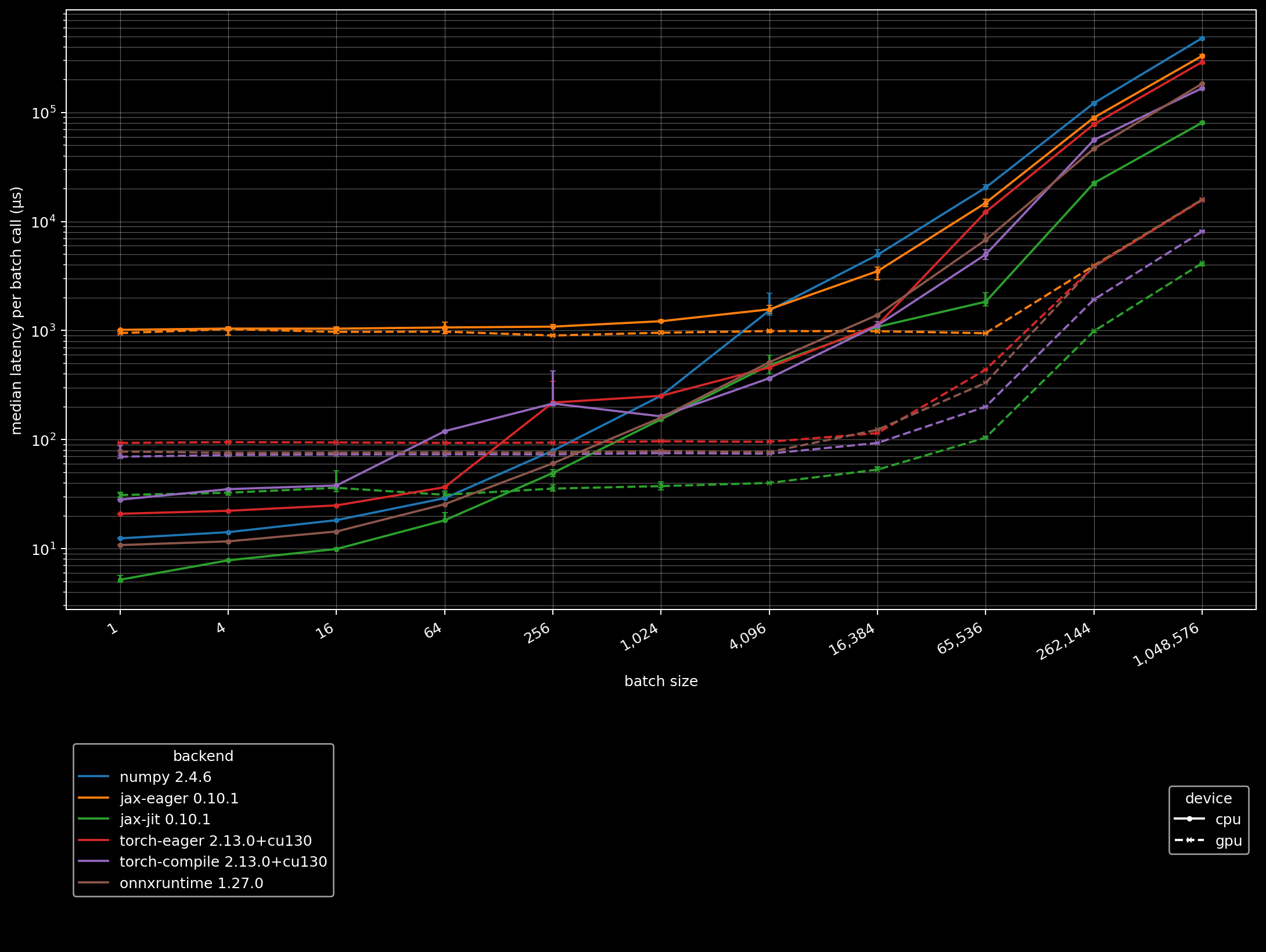
Here is a benchmark of Acropole. On my machine jax.jit achieves 2-4x speedup compared to onnxruntime-gpu depending on the batch size. Note that input arrays are assumed to be on the device the model is located, so GPU benchmarks do not include the CPU-GPU synchronisation latency.
To use JAX JIT on GPU, use tree_map() to move the model to another device:
uv add "aerocore[jax_gpu,matplotlib]"
import jax
import jax.numpy as jnp

import numpy as np
from aerocore.acropole import fuel_flow, load_aircraft_database, load_model
from aerocore.utils import tree_map

device = jax.devices("gpu")[0]
model = tree_map(lambda array: jnp.asarray(array, device=device), load_model())
aircraft = load_aircraft_database()["A320"]


def predict(
    groundspeed: jax.Array, altitude: jax.Array, vertical_rate: jax.Array
) -> jax.Array:
    return fuel_flow(  # type: ignore[no-any-return]
        model=model,
        aircraft=aircraft,
        groundspeed=groundspeed,
        altitude=altitude,
        vertical_rate=vertical_rate,
        xp=jnp,
    )


predict = jax.jit(predict, device=device)
print(
    np.asarray(
        predict(
            groundspeed=jnp.asarray([180.0, 450.0, 250.0], device=device),
            altitude=jnp.asarray([0.0, 30_000.0, 40_000.0], device=device),
            vertical_rate=jnp.asarray([3_000.0, 0.0, -2_000.0], device=device),
        )
    )
)
[1.9125862 0.75758696 0.09448687]
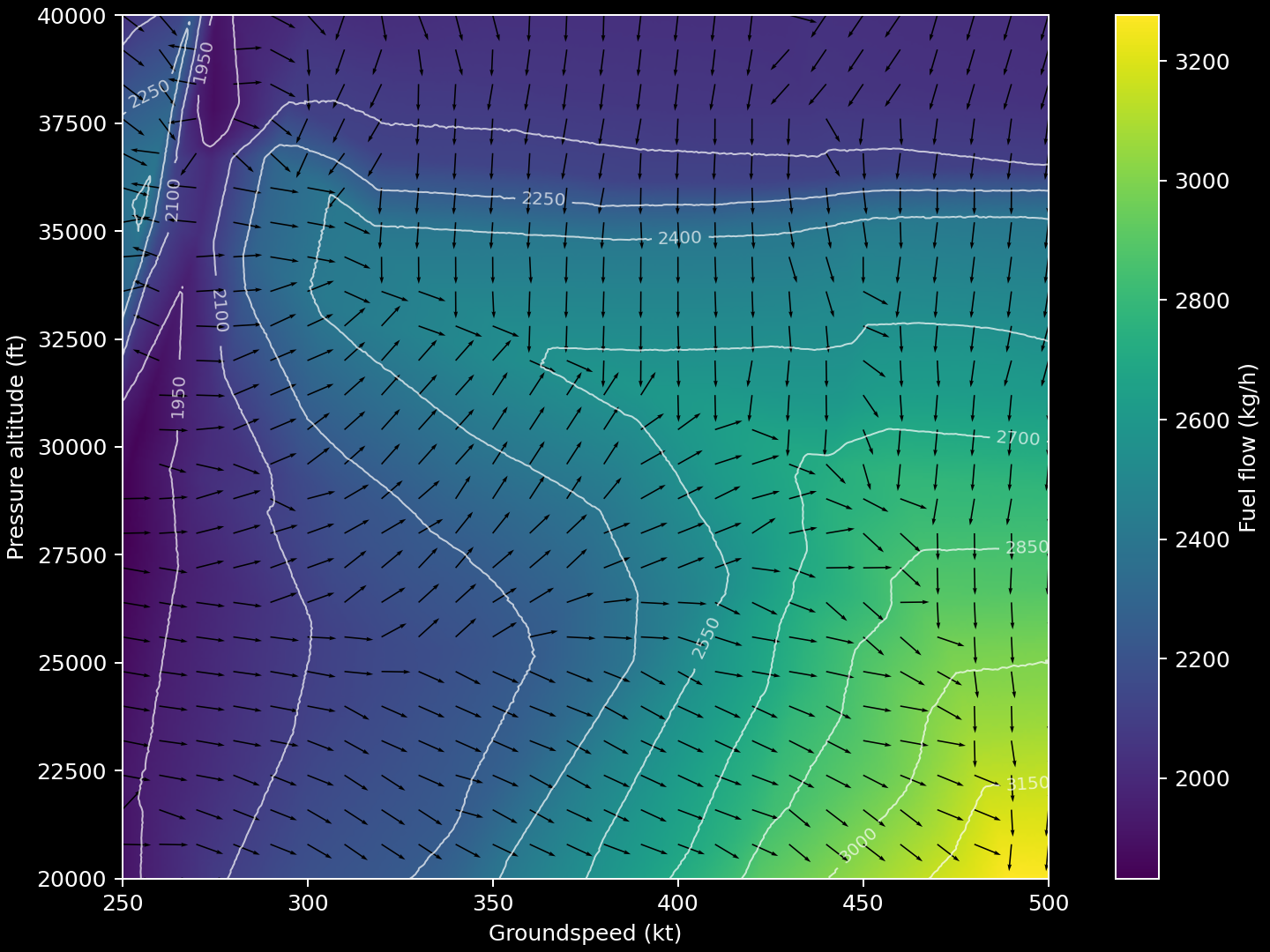
A toy example of using jax.value_and_grad to show the direction of the steepest increase in fuel flow over a grid of altitude and groundspeed, for a steady, level, unaccelerated A320 flight at 65 tonnes:
code
from pathlib import Path

import isqx
import jax
import jax.numpy as jnp
from matplotlib import pyplot as plt

import aerocore.types as t
from aerocore.acropole import fuel_flow, load_aircraft_database, load_model
from aerocore.utils import tree_map

MIN_GROUNDSPEED: t.GsKt = 250.0
MAX_GROUNDSPEED: t.GsKt = 500.0
MIN_ALTITUDE: t.PressureAltitudeFt = 20_000.0
MAX_ALTITUDE: t.PressureAltitudeFt = 40_000.0
kg_per_s_to_kg_per_h = isqx.convert(
    isqx.KG * isqx.S**-1, isqx.KG * isqx.HOUR**-1
)
GRID_SIZE = 401
ARROW_STRIDE = 16


device = jax.devices("gpu")[0]
model = tree_map(
    lambda array: jax.device_put(array, device=device), load_model()
)
aircraft = load_aircraft_database()["A320"]
mass = jax.device_put(65_000.0, device=device)
zero = jax.device_put(0.0, device=device)


def steady_cruise_fuel_flow(point: jax.Array) -> jax.Array:
    scaled_groundspeed, scaled_altitude = point
    groundspeed = MIN_GROUNDSPEED + scaled_groundspeed * (
        MAX_GROUNDSPEED - MIN_GROUNDSPEED
    )
    return fuel_flow(  # type: ignore[no-any-return]
        model=model,
        aircraft=aircraft,
        groundspeed=groundspeed,
        altitude=MIN_ALTITUDE + scaled_altitude * (MAX_ALTITUDE - MIN_ALTITUDE),
        vertical_rate=zero,
        airspeed=groundspeed,
        mass=mass,
        altitude_rate=zero,
        groundspeed_rate=zero,
        airspeed_rate=zero,
        xp=jnp,
    )


scaled_gs = jnp.linspace(0.0, 1.0, GRID_SIZE, device=device)
scaled_alt = jnp.linspace(0.0, 1.0, GRID_SIZE, device=device)
scaled_gs_grid, scaled_alt_grid = jnp.meshgrid(scaled_gs, scaled_alt)
points = jnp.stack((scaled_gs_grid, scaled_alt_grid), axis=-1)

ff_and_grad = jax.jit(
    jax.vmap(jax.value_and_grad(steady_cruise_fuel_flow)), device=device
)
ff, grad = ff_and_grad(points.reshape(-1, 2))
ff_grid = ff.reshape(GRID_SIZE, GRID_SIZE)
grad_grid = grad.reshape(GRID_SIZE, GRID_SIZE, 2)
unit_grad_grid = grad_grid / jnp.linalg.norm(grad_grid, axis=-1, keepdims=True)

gs = MIN_GROUNDSPEED + scaled_gs_grid * (MAX_GROUNDSPEED - MIN_GROUNDSPEED)
alt = MIN_ALTITUDE + scaled_alt_grid * (MAX_ALTITUDE - MIN_ALTITUDE)
unit_grad = unit_grad_grid * jnp.asarray(
    (MAX_GROUNDSPEED - MIN_GROUNDSPEED, MAX_ALTITUDE - MIN_ALTITUDE)
)

plt.style.use("dark_background")
figure, axis = plt.subplots(figsize=(8, 6), constrained_layout=True)
image = axis.imshow(
    kg_per_s_to_kg_per_h(ff_grid),
    origin="lower",
    extent=(MIN_GROUNDSPEED, MAX_GROUNDSPEED, MIN_ALTITUDE, MAX_ALTITUDE),
    aspect="auto",
    interpolation="bilinear",
)
contours = axis.contour(
    gs,
    alt,
    kg_per_s_to_kg_per_h(ff_grid),
    levels=10,
    colors="white",
    linewidths=0.8,
    alpha=0.7,
)
axis.clabel(contours, inline=True, fontsize=8, fmt="%.0f", colors="white")
axis.quiver(
    gs[::ARROW_STRIDE, ::ARROW_STRIDE],
    alt[::ARROW_STRIDE, ::ARROW_STRIDE],
    unit_grad[::ARROW_STRIDE, ::ARROW_STRIDE, 0],
    unit_grad[::ARROW_STRIDE, ::ARROW_STRIDE, 1],
    angles="xy",
    scale_units="xy",
    scale=32,
    width=0.0015,
)
axis.set_xlabel("Groundspeed (kt)")
axis.set_ylabel("Pressure altitude (ft)")
figure.colorbar(image, ax=axis, label="Fuel flow (kg/h)")
It supports PyTorch CUDA too:
uv add "aerocore[torch_gpu]"
import torch

from aerocore.acropole import fuel_flow, load_aircraft_database, load_model
from aerocore.utils import tree_map

device = torch.device("cuda")
model = tree_map(lambda array: torch.from_numpy(array).to(device), load_model())
aircraft = load_aircraft_database()["A320"]
print(
    fuel_flow(
        model=model,
        aircraft=aircraft,
        groundspeed=torch.tensor([180.0, 450.0, 250.0], device=device),
        altitude=torch.tensor([0.0, 30_000.0, 40_000.0], device=device),
        vertical_rate=torch.tensor([3_000.0, 0.0, -2_000.0], device=device),
        xp=torch,
    )
    .cpu()
    .numpy()
)
[1.9122902 0.7568858 0.09444637]
Any Array API compatible interface is also supported.
Development
./scripts/acropole_prepare_model.py build \
  --output-dir dist/acropole-v0.1.0

# test the published assets
uv run pytest -q tests/test_acropole.py

./scripts/acropole_benchmark.py \
  --output /tmp/acropole-benchmark.jsonl \
  --plot docs/assets/img/acropole-benchmark.png